Network Optimization
Network optimization means reducing the time taken to download resources from the internet.
Every file your app loads, such as HTML, CSS, JavaScript, images, fonts, or API data, travels over the network. If that journey is slow, the app feels slow.
Network Optimization = Send less data, make fewer requests, and prepare important resources early.
One-line idea: Network Optimization = Make fewer requests, send smaller files, prepare resources early, and reuse cached data.
Core Concepts
Why It Matters
Network delays directly affect how fast users see and use your app.
If network loading is optimized, the app feels:
- faster
- smoother
- more responsive
- less frustrating on slow networks
A slow network path can make the site feel slow even when the backend is fast.
Critical Rendering Path
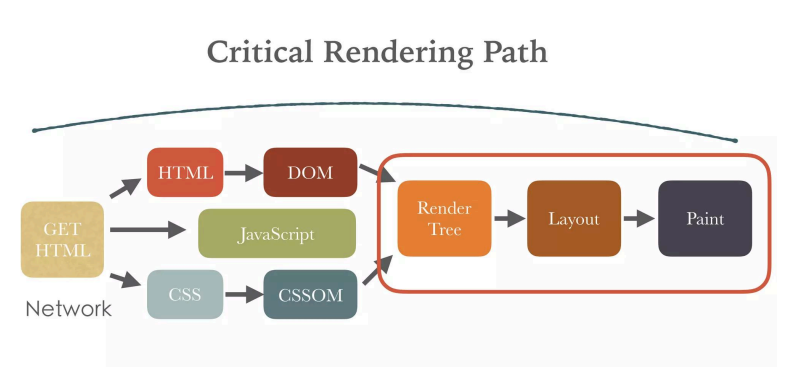
The Critical Rendering Path, also called CRP, is how the browser turns code into something visible on the screen.
The browser roughly does this:
HTML -> DOM
CSS -> CSSOM
DOM + CSSOM -> Render Tree
Render Tree -> Layout
Layout -> Paint
Paint -> Screen
If this path is blocked, users see a blank screen for longer.
Critical Rendering Path: Blocking Example
<head>
  <link rel="stylesheet" href="styles.css" />
  <script src="app.js"></script>
</head>
This is slower because CSS and JavaScript can block rendering.
Critical Rendering Path: Better Example
<head>
  <style>
    body {
      margin: 0;
      font-family: sans-serif;
    }
  </style>

  <link
    rel="preload"
    href="styles.css"
    as="style"
    onload="this.rel='stylesheet'"
  />

  <script src="app.js" defer></script>
</head>
This improves loading by inlining critical CSS, preloading important styles, and deferring JavaScript.
Minimize Network Requests
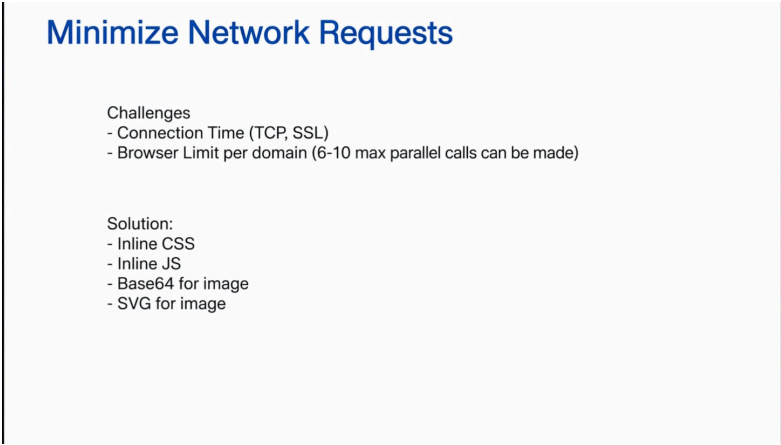
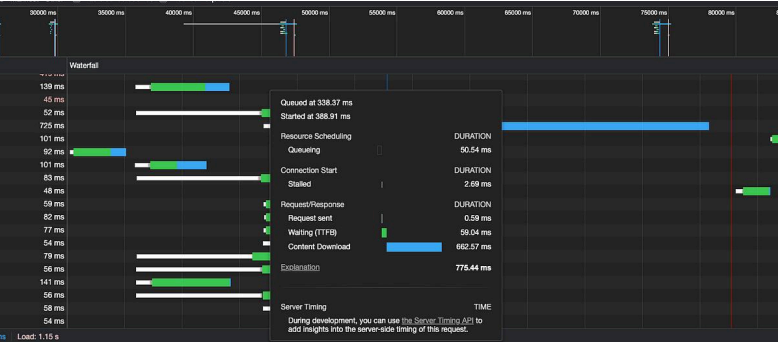
Every file creates a network request.
Each request has cost:
- DNS lookup
- TCP connection
- SSL/TLS setup
- latency
- browser request limits per domain
More requests usually mean more waiting, especially on mobile or slow networks.
Minimize Network Requests: What to Do
- Combine files where useful.
- Remove unused code.
- Minify CSS and JavaScript.
- Use fewer images.
- Use optimized image formats.
- Avoid loading non-critical resources initially.
Minimize Network Requests: Practical Examples
Inline critical CSS:
<style>
  body {
    margin: 0;
    font-family: sans-serif;
  }
</style>
Defer non-critical JavaScript:
<script src="app.js" defer></script>
Use SVG for icons:
<img src="icon.svg" alt="icon" />
Import only what is needed:
import debounce from "lodash/debounce";
Async JavaScript
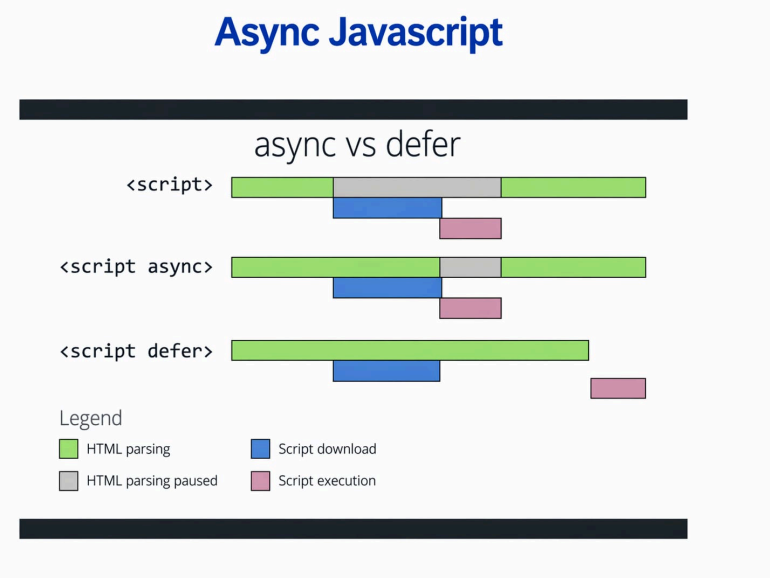
By default, JavaScript can block HTML parsing.
That means the browser may stop building the page until the script is downloaded and executed.
Using async or defer helps scripts load without blocking the page unnecessarily.
Async JavaScript: async
<script src="analytics.js" async></script>
Use async for independent scripts like analytics or ads.
Behavior:
- downloads in parallel
- executes immediately when ready
- execution order is not guaranteed
Async JavaScript: defer
<script src="app.js" defer></script>
Use defer for main application logic.
Behavior:
- downloads in parallel
- executes after HTML parsing
- keeps execution order
Practical Examples
Avoid Redirection
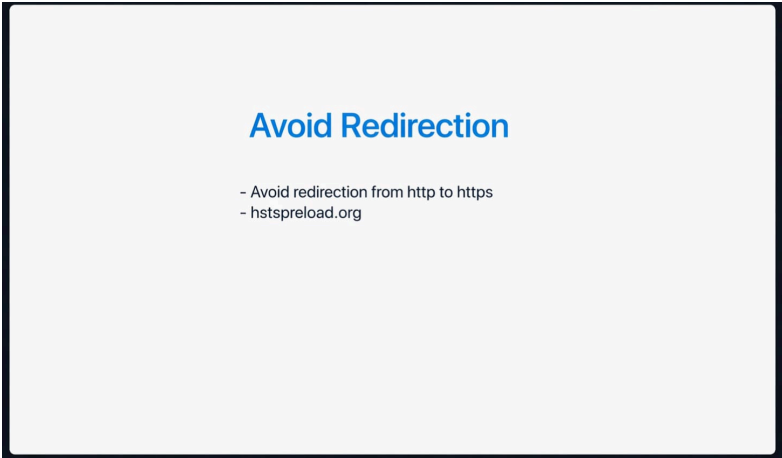
A redirect means the browser makes an extra request before reaching the final page.
Example of a slow redirect chain:
http://example.com
-> https://example.com
-> https://www.example.com
Each redirect adds an extra network hop, which slows down page load.
Avoid Redirection: Better Approach
- Link directly to the final URL.
- Use HTTPS from the beginning.
- Avoid redirect chains.
- Keep redirects as low as possible.
HSTS can help the browser use HTTPS directly:
Strict-Transport-Security: max-age=31536000; includeSubDomains; preload
Resource Hinting
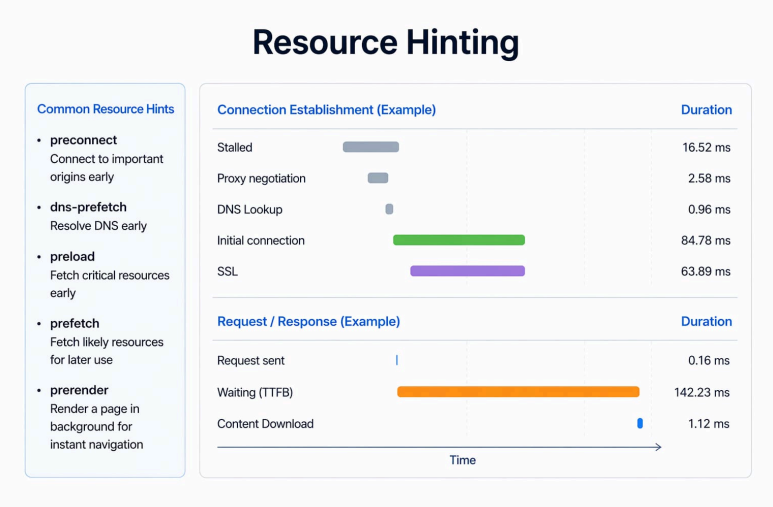
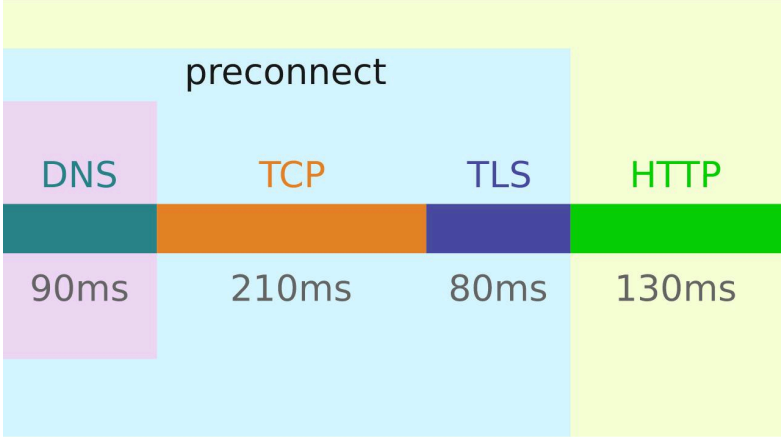
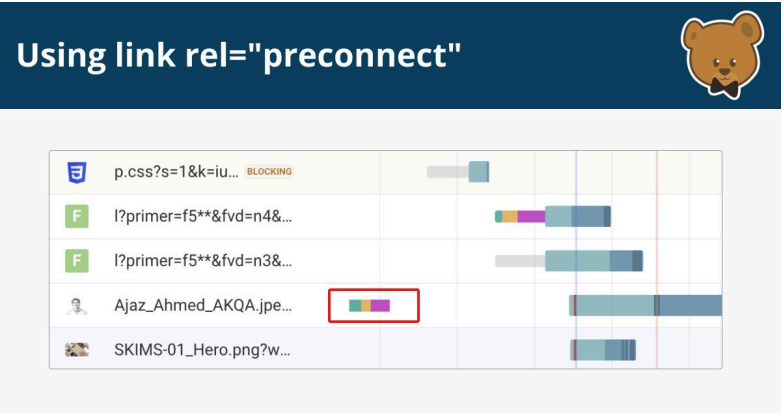
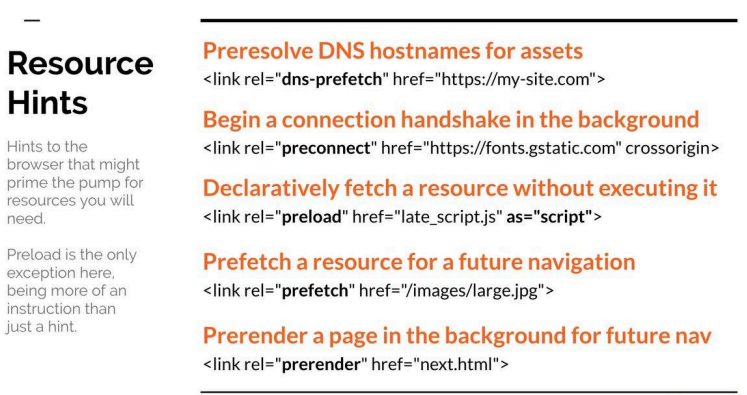
Resource hinting tells the browser what it may need next.
This helps the browser prepare early instead of discovering resources late.
Without hints, the browser reacts late.
With hints, the browser prepares early.
Resource Hinting: Common Resource Hints
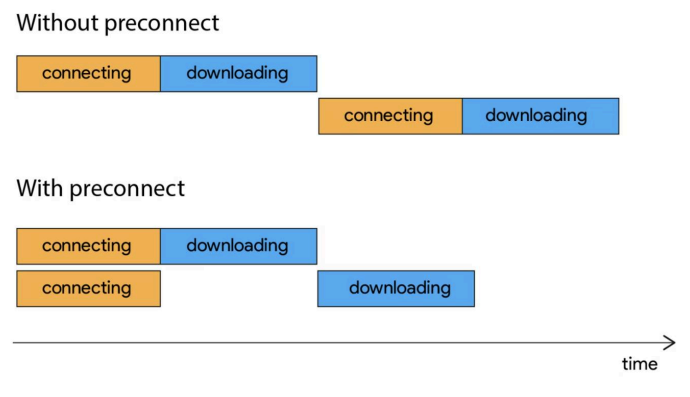
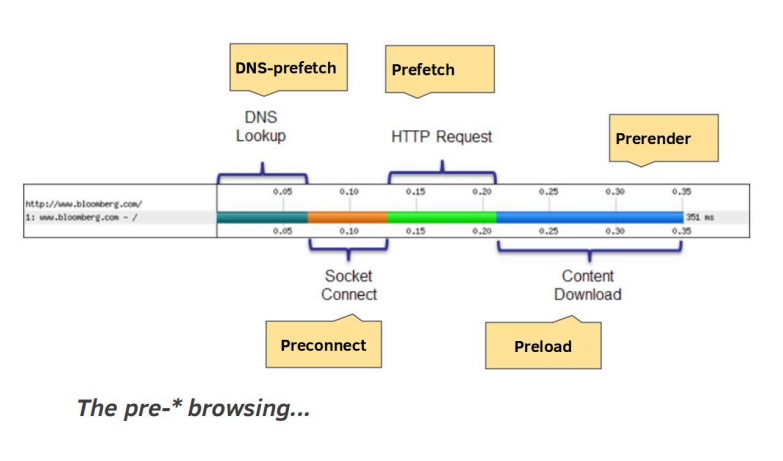
Preconnect sets up connection early:
<link rel="preconnect" href="https://api.example.com" />
DNS prefetch resolves domain early:
<link rel="dns-prefetch" href="//cdn.example.com" />
Preload loads important resources as soon as possible:
<link rel="preload" href="styles.css" as="style" />
Prefetch loads future resources:
<link rel="prefetch" href="next-page.js" />
Resource Hint Priorities
Not every resource has the same priority.
Some are needed immediately, and some can wait.
| Priority | Hint | Use Case |
|---|---|---|
| 1 | preload | Critical CSS, fonts, hero image |
| 2 | preconnect | Important APIs or CDN domains |
| 3 | dns-prefetch | Early DNS lookup for external domains |
| 4 | prefetch | Future page or route resources |
| 5 | prerender | Entire next page loaded in background |
Resource Hint Priorities: How to Think
Need it now? -> preload
Will connect soon? -> preconnect
Might need later? -> prefetch
Do not preload everything. If everything is high priority, nothing is high priority.
HTTP Upgrade
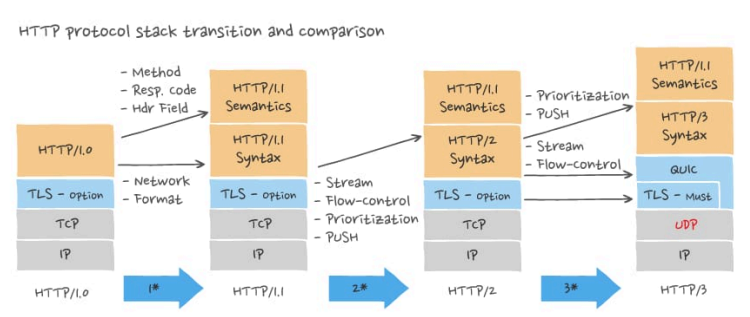
HTTP upgrade means using newer HTTP versions so the browser and server communicate more efficiently.
Older versions can create delays when loading many resources.
HTTP Upgrade: HTTP/1.1
HTTP/1.1 = Requests stand in line.
In HTTP/1.1, multiple resources often need multiple connections.
If one request is slow, others may get delayed.
HTTP Upgrade: HTTP/2
HTTP/2 = Requests move together.
HTTP/2 allows multiple requests to travel on a single connection using multiplexing.
It also compresses headers, so less data is sent.
HTTP Upgrade: HTTP/3
HTTP/3 = Requests move freely without blocking.
HTTP/3 uses QUIC over UDP.
It improves connection speed and works better on unstable or mobile networks.
Compression and Caching
Compression and caching reduce the amount of data that must travel over the network.
Compression and Caching: Compression
Compression reduces file size before sending it to the browser.
Common options:
- Brotli
- Gzip
Smaller files -> faster downloads -> better load time
Compression and Caching: Caching
Caching stores resources in the browser so they do not need to be fetched again.
Useful headers include:
Cache-ControlETagLast-ModifiedExpires
First visit -> download resources
Repeat visit -> reuse cached resources
Network Optimization Table
| Area | Main Goal |
|---|---|
| CRP | Show content faster |
| Fewer Requests | Reduce network overhead |
| Async / Defer | Avoid blocking HTML parsing |
| Redirects | Remove extra network hops |
| Resource Hints | Prepare important resources early |
| HTTP Upgrade | Improve request handling |
| Compression | Send smaller files |
| Caching | Reuse previously downloaded resources |
Summary
Network Optimization = Make fewer requests, send smaller files, prepare resources early, and reuse cached data.
Load less
Block less
Redirect less
Prepare earlier
Compress more
Cache better
Use newer HTTP